

Flowmon and WhatsUp Gold - Automatic Threat Detection Through Single Pane of Glass
Monitoring events occurring on a network is vital from a security and application experience perspective. Many Network Detection & Response (NDR) solutions are available to do this monitoring with varying levels of detail and sophistication. Progress Flowmon ADS (Anomaly Detection System) is a comprehensive solution that delivers detailed monitoring and analysis features while providing insights and advice via human-understandable advice on any abnormal activity detected.
The Benefits of a Unified Network View
Many organisations have deployed Progress WhatsUp Gold to provide a single pane of glass view of their network topology and other essential network monitoring functions. WhatsUp Gold has traditionally delivered network mapping, network & application performance stats, system log management, and configuration management for on-premise wired, wireless, and hybrid cloud networks.
Flowmon (and Kemp Technologies) are now part of Progress Software. Flowmon ADS has been integrated into the unified WhatsUp Gold console to add Flowmon’s AI-backed ADS NDR functionality into a single pane of glass view.
For many managed service providers and larger organisations that have Security Information and Event Management (SIEM) systems deployed for their clients or more extensive internal network, the addition of data and visuals from WhatsUp Gold and Flowmon ADS provides timely, relevant, and actionable information about any anomalies occurring on monitored networks.
For SMEs that have limited IT teams to operate a SIEM (and who are not using an external partner MSP at present), the single pane of glass solution delivered by WhatsUp Gold and Flowmon ADS is an ideal way to get the monitoring and actionable reporting that all organisations need to secure and efficiently run their networks.
WhatsUp Gold and Flowmon
WhatsUp Gold and Flowmon have been integrated to deliver ADS information in the WhatsUp Gold console in a way that is understandable for busy IT teams. Info on anything suspicious gets presented with MITRE ATT&CK framework tactics and techniques descriptions. These have been honed over time to be easily understandable and make decisions on what to do quicker and more effective.
Events that get detected by Flowmon ADS appear on the WhatsUp Gold console. The diagram below shows how events that Flowmon detects are displayed in chart form and as a list with more details.
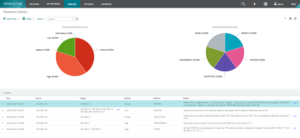
Figure 1: Security events from Flowmon ADS displayed in WhatsUp Gold user interface. In this example, we can see a range of malicious activities conducted by device 192.168.1.50 targeting other devices in the internal network.
Administrators can select events in the list and then drill down to get more information, as shown below.

Figure 2: Drill down from the context menu for an event displayed in WhatsUp Gold.
The details screen is below. In this case, Flowmon reports that a device is scanning the network looking for ways that they can attack and compromise.
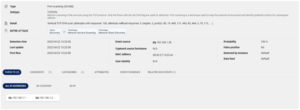
Figure 3: Detail of an event representing discovery tactic through a vertical TCP SYN scan conducted by a device with IP address 192.168.1.50 against two devices, 192.168.1.1 and 192.168.1.2. This screenshot is from the Flowmon ADS page, where WhatsUp Gold will navigate the user automatically when a drill-down is requested.
The available information summarises and further explains the nature of the activity on the network. In addition to the event source IP address, the MAC address or user identity (if available) gets provided. Further details and drill-downs show network traffic that caused the event. All these details can be further augmented by integrated signature-based intrusion detection (leveraging Suricata IDS) or full packet capture if Flowmon Probes are in place to collect network telemetry.
With both solutions deployed, system admins can configure this integration between WhatsUp Gold and Flowmon in minutes. And actionable data will be available after a few minutes of operation when the configuration is enabled — providing immediate insights into what is happening on the network and advice on what should happen to mitigate any threats or alleviate any issues impacting the user application experience.
Find Out More
Reach out to your Renaissance contact, or use this form if you’d like to talk to someone about Flowmon ADS and how you can integrate it into your WhatsUp Gold deployment to get a comprehensive single pane of glass view of your network.