


Confusion in the cloud- Why you should back up Microsoft 365
Microsoft’s M365 suite of SaaS applications are justifiably popular with many large and small organisations. The convenience afforded by the applications within the suite and the interoperability between them and Microsoft Office makes a compelling value proposition. As a result, many businesses have lots of data spread across the various applications in the suite or stored in Microsoft OneDrive cloud-based storage.
However, many of these businesses overlook the need to implement a comprehensive data backup strategy and solution to protect the data in M365. Wait, doesn’t Microsoft back up the data? It depends on what you mean by a backup. Microsoft does ensure the availability of the M365 SaaS cloud-based applications and replicates services and data across multiple regions and data centres. It does this to deliver the level of uptime guaranteed by their SLAs. But it may not protect client data against all the mishaps that can befall it due to normal day-to-day client operations.
Why You Need to Backup M365 Data
Data can be damaged, destroyed or lost from M365 as people use or modify it. Microsoft assumes the responsibility to make the applications, services, and infrastructure underlying M365 resilient, and it provides tools to create policies for data retention. But the responsibility to ensure compliance with local data security and preservation regulations remains with the businesses using M365. Beyond that, the management and security of business data is a fundamental part of basic operations, irrespective of whether the data is on-premise or in the cloud.
Data can be lost or damaged in numerous ways that have had to be managed for years using good backups. These do not go away just because the data is in M365. Events that can lead to data loss include:
- Overwriting a file by accident
- Deleting a file by mistake
- Syncing a corrupt file between devices and OneDrive
- Deliberate deletion by malicious insiders
- External threats like ransomware attacks
- Incorrectly configuring M365 retention policies
Many organisations rely on M365 data retention policies to govern how data gets retained. For example, admins can recover deleted files for up to 30 days under scenarios where someone actively deleted the data. In other scenarios, Microsoft will retain data for up to 180 days in cases of passive deletion. Passive deletion occurs when an M365 subscription period ends.
Retention policies can (if configured correctly) ensure that data gets retained on the system. However, it takes time and skill to get the M365 retention policies and tools working to deliver the data retention and recovery granularity that dedicated backup solutions provide.
You can make your data management in M365 much easier and save valuable team time by deploying a dedicated backup tool designed to work with M365. A tool such as Carbonite Backup for Microsoft 365.
Carbonite Backup for Microsoft 365
Carbonite Backup for Microsoft 365 delivers the same data recovery features that have been available to on-premise deployments for years. Carbonite designed the solution to make M365 cloud data more resilient via an easier to use toolset. Deployment occurs via the Microsoft Azure administration portal, and once deployed, the M365 applications that organisations want to backup and protect can be selected. Carbonite Backup for Microsoft 365 can backup data from OneDrive, Exchange Online, SharePoint Online, Teams, Planner, and M365 Groups.
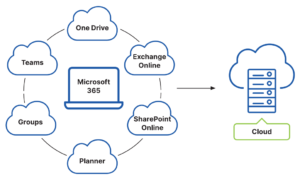
This is a valuable feature for MSPs managing client M365 deployments and providing additional services to enhance the base M365 service delivery. MSPs can back up each client M365 deployment on a cadence that suits their needs using a tool that avoids the complexity of the M365 management interface. The backup frequency needed can be set to a suitable period that delivers a recovery point that suits each organisation.
If data needs recovered, there are multiple options when using Carbonite Backup for Microsoft 365 -
- Recover individual files or folders - to quickly reverse deletions, overwrites, or corruptions, including ransomware encryption (but make sure the ransomware has been removed from devices first!)
- Recover the metadata associated with files and folders - useful to restore permissions and other data descriptors without overwriting file contents.
- Restore everything at once - folders, files, and metadata.
- Recover data and setting in Teams, Planner and Groups.
Providing these options over and above the built-in M365 console and tools gives MSPs and system admins a quick way to recover the data or permissions they need. This streamlines the process of recovering data when it’s been lost or corrupted. And the speed of recovery is often vital when users are trying to get their work done.
The video below gives a short overview of the Carbonite Backup for Microsoft 365 deployment and recovery process.
Conclusion
Data backup is as important today as it’s always been. Just because the data is in M365 doesn’t change that. M365 admins can use data retention policies to determine how long information gets stored on M365. And with granular configuration, they can mitigate many of the threats to data. But the Microsoft 365 admin tools are complex, and not everyone has the time or the skills to protect the data adequately.
Carbonite Backup for Microsoft 365 layers over the M365 tools to deliver the functionality that is available for on-premise data backup solutions. Now MSPs and others can get the same ease of use for M365 data backup and restore. This frees up technical staff to focus on tasks that drive the organisations business forward. Contact us to find out how you can streamline your client’s M365 data backup and recovery options.